By default, a domain controller uses LDAP to provide your clients data from Active Directory (TCP port 389). For example when a client wants to check if a user is member of a group, everything goes through the network in clear text.
If you want to provide LDAP over SSL in your domain to make the LDAP traffic secured, you need to have a so called Domain Controller Authentication certificate (which is in fact a template that describes a certificate for Client and Server authentication plus smart card logon) added to the DCs personal certificate container and taaadaaam, LDAPS will be available (TCP port 636), you should see on your DC something like this:
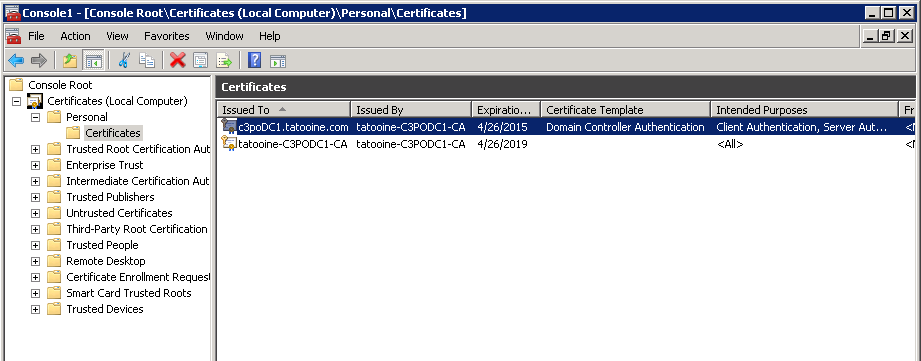
To make sure the certificate is always valid and does not expire, you can setup auto enrolment via GPO if you have a nice AD integrated PKI infrastructure. However, auto enrolment can sometimes fail if for example someone messes up the permissions on the CA server or folder permissions on domain controllers and if that's done at the wrong time, your DC certificate can expire and bang, there's your outage on a Sunday afternoon when some applications stop working because they can't access AD via LDAPS.
The best solution is to put some monitoring in place, e.g. via SCOM or anything similar which checks certificates periodically and if they are about to expire, sends an alert.
However, if you just want to query your DCs to see how those certificates are at a point in time or you want periodic report on them, it's easier to simply write a couple of lines in PowerShell.
Enumerate certificates on remote hosts
It's easy to get a list of certificates from a remote host:$srv = "c3podc1"
$certStore = New-Object System.Security.Cryptography.X509Certificates.X509Store("\\$srv\My", "LocalMachine")
$certStore.Open("ReadOnly")
$certStore.certificates
But this does not give you all the fields you want to read, e.g. you may have many certs installed on your DC but you only want to know about the Domain Controller Authentication one, so you need to somehow enumerate the Cert Template names as well (see screen shot above), here is the trick to list all certificates' template names:
$certStore.certificates | %{($_.extensions | ?{$_.oid.friendlyname -match "template"}).format(0) -replace "(.+)?=(.+)\((.+)?", '$2'}
Basically, you need to go through each certificate's 'extensions' and see if the 'oid.friedlyname' contain template, if it is, then use the format method of the X509Extension object to get the name of the template. You will get it with a lot of junk, like this:
Template=Domain Controller Authentication(1.3.6.1.4.1.311.21.8.13987996.9101750.1067918.14758690.631985.210.1.28), Major Version Number=110, Minor Version Number=0
You can use the -replace operator to pick out the string which comes after the first '=':

List Domain Controller Authentication certificates
Now we can list all certificates, we can even pick up the one with Domain Controller Authentication template, we just need to read the date when it expires and then mark it with some RAG (red /amber / green) status based on how close it is to be expired -for me I mark it RED if it is to expire within 30 days because based on my cert template auto enrolment should renew the cert in the last 6 weeks:
Here is the simplified script (you can add function to send mails, log actions...etc., based on some of the previous posts in this blog):
 $hostlist = @($Input)

 foreach($srv in $hostlist){
    $certStore = New-Object System.Security.Cryptography.X509Certificates.X509Store("\\$srv\My", "LocalMachine")
    $certStore.Open("ReadOnly")
    $certStore.certificates | %{
       $obj = "" | Select Subject,Template,ValidUntil,RAG
       $obj.Subject = ($_.extensions | ?{$_.oid.friendlyname -match "Subject Alternative Name"}).format(0) -replace "^.+=", ""
       $obj.Template = ($_.extensions | ?{$_.oid.friendlyname -match "template"}).format(0) -replace "(.+)?=(.+)\((.+)?", '$2'
       $obj.ValidUntil = $_.NotAfter

       if($obj.Template -ieq "Domain Controller Authentication"){
          if((get-date($obj.ValidUntil)) -gt (Get-Date).adddays(30)){
             $obj.RAG = "GREEN"
          }
          else{
             $obj.RAG = "RED"
          }
          $obj
       }
    }
 }
t
