Showing posts with label AD. Show all posts

23 November, 2015

Which DNS records would be scavenged - AD

In connection with a previous post on listing DNS scavenging settings, I thought I'd post those couple of lines of codes which gave me confidence before turning on or modifying scavenging settings - before I turn on any automation which only exists to delete stuff from production environment I always have a second thought when I put my head on the pillow, "did I really set the right values or will the phone ring in 2 hours waking me up and telling me there's a DNS outage?"

To make it a bit more scientific than "close your eyes and click OK", here is a couple of lines of PS which can help you identify all records from a DNS zone which would be deleted based on your thresholds.
  • Set parameters, DNS server name, the DNS zone and the age threshold which specifies how many days older records should be deleted. Scavenging has a 7 + 7 days "No-refresh" + "Refresh" interval, so records older than 14 days will potentially be deleted when scavenging process runs:
    #set parameters
    $server = "c3podc1"
    $domain = "tatooine.com"
    $agetreshold = 14
  • Threshold in hours from Microsoft's beginning of time definition (1st Jan 1601):
    # calculate how many hours is the age which will be the threshold
    $minimumTimeStamp = [int] (New-TimeSpan -Start $(Get-Date ("01/01/1601 00:00")) -End $((Get-Date).AddDays(-$agetreshold))).TotalHours
  • Enumerate all records older than the time threshold
    # get all records from the zone whose age is more than our threshold $records = Get-WmiObject -ComputerName $dnsServer -Namespace "root\MicrosoftDNS" -Query "select * from MicrosoftDNS_AType where Containername='$domain' AND TimeStamp<$minimumTimeStamp AND TimeStamp<>0 "
  • List the records and the time stamps
    # list the name and the calculated last update time stamp
    $records | Select Ownername, @{n="timestamp";e={([datetime]"1.1.1601").AddHours($_.Timestamp)}}
The output should look like this:
DNS records with time stamps


The full script:
 #set parameters  
 $dnsServer = "c3podc1"  
 $domain = "tatooine.com"  
 $agetreshold = 14  
   
 # calculate how many hours is the age which will be the threshold  
 $minimumTimeStamp = [int] (New-TimeSpan -Start $(Get-Date ("01/01/1601 00:00")) -End $((Get-Date).AddDays(-$agetreshold))).TotalHours  
   
 # get all records from the zone whose age is more than our threshold   
 $records = Get-WmiObject -ComputerName $dnsServer -Namespace "root\MicrosoftDNS" -Query "select * from MicrosoftDNS_AType where Containername='$domain' AND TimeStamp<$minimumTimeStamp AND TimeStamp<>0 "  
   
 # list the name and the calculated last update time stamp  
 $records | Select Ownername, @{n="timestamp";e={([datetime]"1.1.1601").AddHours($_.Timestamp)}}  


t


26 April, 2014

Validate Domain Controller certificates - AD

This is a specific post about Domain Controller Authentication certificates but the problem and the solution can be applied to any type of certificate you have on your servers.

By default, a domain controller uses LDAP to provide your clients data from Active Directory (TCP port 389).  For example when a client wants to check if a user is member of a group, everything goes through the network in clear text.
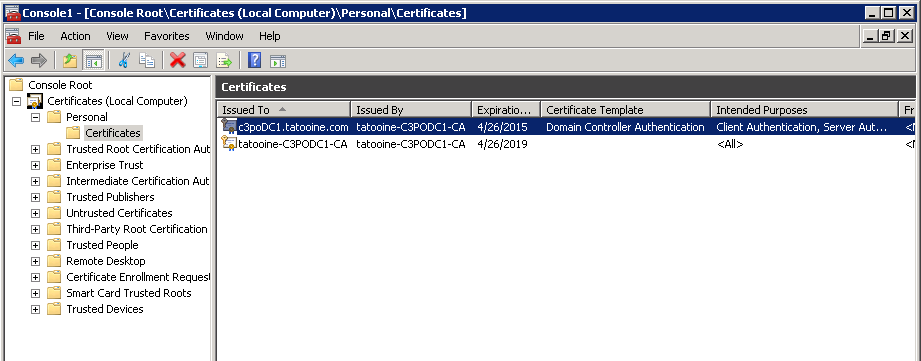
If you want to provide LDAP over SSL in your domain to make the LDAP traffic secured, you need to have a so called Domain Controller Authentication certificate (which is in fact a template that describes a certificate for Client and Server authentication plus smart card logon) added to the DCs personal certificate container and taaadaaam, LDAPS will be available (TCP port 636), you should see on your DC something like this:


To make sure the certificate is always valid and does not expire, you can setup auto enrolment via GPO if you have a nice AD integrated PKI infrastructure. However, auto enrolment can sometimes fail if for example someone messes up the permissions on the CA server or folder permissions on domain controllers and if that's done at the wrong time, your DC certificate can expire and bang, there's your outage on a Sunday afternoon when some applications stop working because they can't access AD via LDAPS.

The best solution is to put some monitoring in place, e.g. via SCOM or anything similar which checks certificates periodically and if they are about to expire, sends an alert.

However, if you just want to query your DCs to see how those certificates are at a point in time or you want periodic report on them, it's easier to simply write a couple of lines in PowerShell.

Enumerate certificates on remote hosts

It's easy to get a list of certificates from a remote host:
$srv = "c3podc1"
$certStore = New-Object System.Security.Cryptography.X509Certificates.X509Store("\\$srv\My", "LocalMachine")
$certStore.Open("ReadOnly")
$certStore.certificates


But this does not give you all the fields you want to read, e.g. you may have many certs installed on your DC but you only want to know about the Domain Controller Authentication one, so you need to somehow enumerate the Cert Template names as well (see screen shot above), here is the trick to list all certificates' template names:
$certStore.certificates | %{($_.extensions | ?{$_.oid.friendlyname -match "template"}).format(0) -replace "(.+)?=(.+)\((.+)?", '$2'}

Basically, you need to go through each certificate's 'extensions' and see if the 'oid.friedlyname' contain template, if it is, then use the format method of the X509Extension object to get the name of the template. You will get it with a lot of junk, like this:

Template=Domain Controller Authentication(1.3.6.1.4.1.311.21.8.13987996.9101750.1067918.14758690.631985.210.1.28), Major Version Number=110, Minor Version Number=0

You can use the -replace operator to pick out the string which comes after the first '=':

List Domain Controller Authentication certificates

Now we can list all certificates, we can even pick up the one with Domain Controller Authentication template, we just need to read the date when it expires and then mark it with some RAG (red /amber / green) status based on how close it is to be expired -for me I mark it RED if it is to expire within 30 days because based on my cert template auto enrolment should renew the cert in the last 6 weeks:

Here is the simplified script (you can add function to send mails, log actions...etc., based on some of the previous posts in this blog):
 $hostlist = @($Input)  
   
 foreach($srv in $hostlist){  
    $certStore = New-Object System.Security.Cryptography.X509Certificates.X509Store("\\$srv\My", "LocalMachine")  
    $certStore.Open("ReadOnly")  
    $certStore.certificates | %{  
       $obj = "" | Select Subject,Template,ValidUntil,RAG  
       $obj.Subject = ($_.extensions | ?{$_.oid.friendlyname -match "Subject Alternative Name"}).format(0) -replace "^.+=", ""  
       $obj.Template = ($_.extensions | ?{$_.oid.friendlyname -match "template"}).format(0) -replace "(.+)?=(.+)\((.+)?", '$2'  
       $obj.ValidUntil = $_.NotAfter  
   
       if($obj.Template -ieq "Domain Controller Authentication"){  
          if((get-date($obj.ValidUntil)) -gt (Get-Date).adddays(30)){  
             $obj.RAG = "GREEN"  
          }  
          else{  
             $obj.RAG = "RED"  
          }  
          $obj     
       }     
    }  
 }  


t


15 March, 2013

Enumerate eventlog: NETLOGON errors of broken secure channel - AD

If you have a big Active Directory, you will always have noise in the eventlog of your domain controllers which is not what you want because you might miss the wood... you know, you can't see the wood from the trees.
Sometimes the noisiest one is the NETLOGON service because whenever a machine which either forgot its password or has a broken secure channel or doesn't have an account in AD tries to connect to a DC, Netlogon service throws and error to the System log. Don't ask me why it's an error, in my view it should be a warning (tops) as it's not really an error of NETLOGON. Moreover, if I was MSFT, I would have made it an optional event turned on/off via registry, similar to the NTDS diagnostics events under HKLM\SYSTEM\CurrentControlSet\services\NTDS\Diagnostics.

Anyway, let's not dwell on it but try to do something about it. If you are a conscientious AD guy (and why wouldn't you be, we all are conscientious when it's about work ;) ) you want to make things right. First step: let's identify the machines which have broken secure channel. It shouldn't be difficult, the machine name is part of the event message. However, I have 100+ domain controllers, 30+ sites, reading through the eventlog on a regular basis is not an option. Need a script!

The script which you'll see at the bottom of the article is capable of:
  • Enumerating the netlogon events from a DC and parse the error message and the client name from the event description
  • Can work against 1 DC or a list of DCs in a specified site

Some interesting facts about the script. It uses Get-WinEvent command. If you use it remotely, it can be quite slow, e.g. let's list all events with EventID 5805 from the System Event log:
Get-WinEvent -ea SilentlyContinue -ComputerName c3poDC -LogName System | where{$_.id -eq 5805}

It takes a bit more than 30 seconds:


Obviously, the biggest issue is that it takes all events and then filters to the eventid afterwards. Let's try a trick, hash table. It's in the help of the command that it takes filters in hash table format. Excellent, let's try this then:
Get-WinEvent -ea SilentlyContinue -ComputerName c3poDC -FilterHashtable @{LogName = "System"; id=5805}

Hmmm... not bad, 4 seconds, now we are talking.


We can just dress up the script a bit:
  • take an integer which determines how many days we want to go back in the log (makes the query even quicker):
    $after = (Get-Date).adddays(-$lastday)
    Get-WinEvent -ea SilentlyContinue -ComputerName $srv -FilterHashtable @{LogName = "System"; StartTime = $after; id=5805}
  • take DC name which we want to query
  • take site name, enumerate the DCs in the site, and then run through them:
    $dclist = Get-ADDomainController -filter * | where{$_.site -ieq $site} | %{$_.name}
  • parse the client name from the event message
    $obj.Computer = [regex]::Match($_.message, "\d|\w+ failed").Value -ireplace " failed",""
  • make sure we only pick up a client name only once, so we have a unique list of clients with secure channel issues at the end:
    if($computerList -inotcontains $obj.Computer){
The full script with comments:
 param(      [string] $dcname = "",  
           [string] $site = "",  
           [int] $lastday = 2)  
 # if -dcname is not specified, but -site is, let's get the ist of DCs from that site  
 if(!$dcname -and $site){  
      Import-Module activedirectory  
      $dclist = Get-ADDomainController -filter * | where{$_.site -ieq $site} | %{$_.name}  
 }  
 else{  
      $dclist = @($dcname)  
 }  
 $dclist  
 # generate the start date for the eventlog query  
 $after = (Get-Date).adddays(-$lastday)  
 $objColl = $computerList = @()  
 if($dclist.length -gt 0){  
      foreach($srv in $dclist){  
           # get the netlogon 5805 events from the eventlog generated after the given date  
           Get-WinEvent -ea SilentlyContinue -ComputerName $srv -FilterHashtable @{LogName = "System"; StartTime = $after; id=5805} | %{  
                $obj = "" | select DC,Computer,message,Date  
                $obj.DC = $srv  
                # parse the computername from the event message  
                $obj.Computer = [regex]::Match($_.message, "\d|\w+ failed").Value -ireplace " failed",""  
                # if we haven't recorded the alert about the given computerm then record it  
                if($computerList -inotcontains $obj.Computer){  
                     $obj.message = $_.message.Split("`n")[1]  
                     $obj.Date = $_.TimeCreated  
                     # add the computername to an array where we can check if we have picked up an event on the given computer already  
                     $computerList += $obj.Computer  
                     $objColl += $obj  
                }  
           }  
      }  
 }  
 else{  
      Write-Host -ForegroundColor "red" "No DC or Site specified."  
 }  
 $objColl  


11 November, 2012

Get list of GCs - Active Directory


Ok, here is the next bit. I have many domain controllers (DC) in an Active Directory forest and need to know which domain controller is a Global Catalog (GC). Read it carefully: it's not enough to list which DCs have the GC flag set, I need to know which DC is properly advertised as a GC. Why? Because having enough number of healthy GCs in a forest is essential for Exchange Address Book lookups and for Universal Group membership caching. And again, you can activate the GC flag in dssite.msc many times, if you have an AD database with size of 10+ GB, it will take time to get all the global catalog data built up and replicated across.

Obviously, if you had 2 DCs, you could look into the eventlog and see if there's any eventid 1126 in the log, but doing it every day with every domain controller, after reboot...nah, you don't want to go down that way.

First, let's get the list of DCs in a particular domain. There are many ways to do this, i.e. if you don't have Windows 2008 in your environment , you can do this:
([System.DirectoryServices.ActiveDirectory.DomainController]::findall((new-object System.DirectoryServices.ActiveDirectory.DirectoryContext("Domain","tatooine.com"))))

If you have 2008 DCs:
import-module ActiveDirectory
$DCs = Get-ADDomainController -filter * -DomainName tatooine.com

To list which DC is advertised as a GC, you can use the isGlobalCatalogReady RootDSE attribute, on Windos 2003 DCs:
gc dcs.txt | %{$p="" | select ComputerName,Is_GC; $p.ComputerName=$_; $p.Is_gc=(([adsi]("LDAP://" + $_ + "/RootDSE")).isGlobalCatalogReady); $p}


On Windows 2008 DCs:
$GCs = Get-ADDomainController -filter { IsGlobalCatalog -eq $True}

Let's combine this with checking which DC should really be a GC, so where the GC flag is set and have a full list of DCs with the two parameters:
- GC flag's status on the server
- Is GC ready flag on the server

$objColl = @(); $DCs | %{
   # create object with 3 properties   $psObj = "" | select ComputerName,Is_GC_Ready,Is_GC_set
   $psObj.ComputerName = $_     # get if the particular DC is advertised as a GC
   $RootDSE = ([adsi]("LDAP://" + $_ + "/RootDSE"))
   $psObj.Is_gc_ready = $RootDSE.isGlobalCatalogReady
     # enumerate the GC flag of the server
   $ntdsObj = $RootDSE.Get('dsServiceName')
   $psObj.Is_gc_set = ([adsi]"LDAP://$_/$ntdsObj").Get('options')
     $objColl += $psObj
   $psObj}

The object collection can be filtered afterwards, i.e. I want to know the list of DCs which have GC flag set but they are not advertised as GCs:
$objColl | ?{($_.Is_GC_set -eq 1) -and ($_.Is_GC_Ready -eq $false)}

Or list the DCs which do not have the GC flag set:
$objColl | ?{($_.Is_GC_set -eq 0)

Feel free to edit it and experiment with the ActiveDirectory cmdlets on Windows 2008 (Get-ADDomainController)

Clipboar friendly code:
$objColl = @(); 
$DCs | %{ 
  
      # create object with 3 properties
      $psObj = "" | select ComputerName,Is_GC_Ready,Is_GC_set
      $psObj.ComputerName = $_
  
      # get if the particular DC is advertised as a GC
      $RootDSE = ([adsi]("LDAP://" + $_ + "/RootDSE"))
      $psObj.Is_gc_ready = $RootDSE.isGlobalCatalogReady
  
      # enumerate the GC flag of the server
      $ntdsObj = $RootDSE.Get('dsServiceName')
      $psObj.Is_gc_set = ([adsi]"LDAP://$_/$ntdsObj").Get('options')
  
      $objColl += $psObj
      $psObj
}  

May the force...
t

01 November, 2012

Restore GPO links with PowerShell - Active Directory

I was talking to people on an AD workshop the other day - which was a quite useful workshop BTW - and realised that most trainings and workshops show you how to perform tasks, do troubleshooting or - in this case - perform steps to restore AD in a smaller scale and they don't give you knowledge and mindset on how to do it with 1000+ objects, servers...or whatever.
For example, restore an object, a GPO, cleanup a DC from the environment...etc. But what if I have 50 GPOs to restore and they were linked to 150 OUs? While you learn the GUI way on these workshops, there's no story about an easy option to restore those GPO links on a wider scale.

In fact, there is no way to restore GPO links as such at all. You could perform authoritative restore on all the OUs but it seems overkill to me. Moreover, you would still need to find out which OUs you would need to restore.

I had some spare time during a break on the workshop so I though I'd give it a go and see how I could copy GPO links back from a DC in a Lag site to OUs on a production DC using PowerShell.

Lab:
I had 2 Windows Server 2008 Domain Controllers in the lab, one was in a Lag site with replication restricted to a small window overnight. Lag DC or Lag site means the replication is restricted to a small time window so the DC is intentionally kept behind in the replication to have live data in the system in case accidental deletion or modification happens on objects.The other DC was the production one, where I "accidentally" deleted some GPOs.
I restored the GPOs from the LAG DC with authoritatiove restore, but obviously the links disappeared.
So I had 1 DC where I still had the original state of the GPO links, but I still didn't want to go through all of them on the UI of GPMC. I wanted a quick script which would:
  • Take a list of GPO GUIDs
  • Look-up which OUs had it linked on the Lag DC
  • Go to the Production DC and add these GUIDs back to the gpLink attribute of each OU
Here's what I did (obviously, there should be some error handling and logging in there which I'll leave with the reader for now):
# List of GPO GUIDs I want to search for and restore links
$gpoGUIDsToBeResotred = @("034E8907-6058-4A19-B312-AB2A0408EDE4", "2EC45E73-E6BB-4F39-A221-E40630015B45")
$lagDC = "LAGDC"# DC name where the GPO links still exist
$prodDC = "ProdDC"# DC name where I want to create the GPO links again

# going through all GPO GUIDs 
foreach($gpoGUID in $gpoGUIDsToBeResotred){

    # Searching for OUs which have the give GPO GUID in their gpLink attribute
    Get-ADOrganizationalUnit -server $lagDC -filt 'gplink -like "*$gpoGUID*"' | %{
       $ou = $tmplinks = $null

       # bind the same OU on the Production DC where we want to restore the GPO links
       $ou = Get-ADOrganizationalUnit -server $prodDC -filter 'DistinguishedName -eq $_.DistinguishedName' -prop gplink

      
# store the current content of the gpLink attribute - this is very important as we want to append the attribute, not overwrite
       $tmplinks = $ou.gplink

       # add the new content to the gplink attribute of the OU
       $ou.gplink = $tmplinks + "[LDAP://cn={$gpoGUID},cn=policies,cn=system,DC=litware,DC=com;0]"

      
# commit changes
       Set-ADOrganizationalUnit -Instance $ou
    }
}


To get the GUID of a GPO, you can add a command similar to the below to the beginning of the script (you can also look it up in GPMC):
PS C:\> $gpoGUID = (get-gpo "default domain policy").id.guid

List all OUs which have a particular GPO linked:
PS C:\> Get-ADOrganizationalUnit -server lagDC -filt 'gplink -like "*$gpoGUID*"' | ft


I think, all in all, people can be glad that after so many years Microsoft finally realised that they must start building tools of their core products - such as AD - around PowerShell and move away from providing just a UI. So I'm grateful that I can now go through all my PS scripts which utilise ADSI and replace it with a cmdlet from ActiveDirectory PS module :). Although, you still need a bit of thinking and scripting to make things work.
In this example, you would wonder why I didn't use a command from the GroupPolicy Powershell module to create the GPO links. Well, because there isn't such a command. So there's still way to go for MSFT, but it's a good start.

Use this example above carefully and always test in a QA environment.

Clipboard friendly code:

 # List of GPO GUIDS I want to search for and restore links  
 $gpoGUIDsToBeResotred = @("034E8907-6058-4A19-B312-AB2A0408EDE4", "2EC45E73-E6BB-4F39-A221-E40630015B45")  
 $lagDC = "LAGDC"      # DC name where the GPO links still exist  
 $prodDC = "ProdDC"     # DC name where I want to create the GPO links again  
    
 # going through all GPO GUIDs  
 foreach($gpoGUID in $gpoGUIDsToBeResotred){  
   
      # Searching for OUs which have the give GPO GUID in their gpLink attribute  
      Get-ADOrganizationalUnit -server $lagDC -filt 'gplink -like "*$gpoGUID*"' | %{  
           $ou = $tmplinks = $null  
             
           # bind the same OU on the Production DC where we want to restore the GPO links  
           $ou = Get-ADOrganizationalUnit -server $prodDC -filter 'DistinguishedName -eq $_.DistinguishedName' -prop gplink  
             
           # store the current content of the gpLink attribute - this is very important as we want to append the attribute, not overwrite  
           $tmplinks = $ou.gplink  
             
           # add the new content to the gplink attribute of the OU  
           $ou.gplink = $tmplinks + "[LDAP://cn={$gpoGUID},cn=policies,cn=system,DC=litware,DC=com;0]"  
             
           # commit changes  
           Set-ADOrganizationalUnit -Instance $ou  
      }  
 }  

May the Force...
t