Showing posts with label password. Show all posts

04 January, 2018

Verify password complexity - OS

Not too long ago the news broke that 1.4 billion leaked passwords were being shared all over the place. Obviously, you want to see if your users could be impacted, so one thing that can be done to see if the leaked passwords of users are applicable at all to your environment. If not, then you know that the given password wasn't used in your environment so no need to panic.


Here's an example password policy:
Example password policy with complexity enabled


We would like to see if a given list of passwords conform these settings, mainly the length and complexity. Based on Microsoft's definition a password is complex if contains characters from three of the following five categories: 
  • Uppercase characters of European languages (A through Z, with diacritic marks, Greek and Cyrillic characters)
  • Lowercase characters of European languages (a through z, sharp-s, with diacritic marks, Greek and Cyrillic characters)
  • Base 10 digits (0 through 9)
  • Nonalphanumeric characters: ~!@#$%^&*_-+=`|\(){}[]:;"'<>,.?/


So we want a quick script which verifies if the password is at least 10 characters long and is complex. There are many ways to do it and can be done with hardcore regex patterns or just simple direct checks, here's one not too complicated way to do it, this is the output:


Password complexity check output


the script:
 function checkpwcplx ($passwordString){  
    $pwComplexity = 0  
      
    # checking the minimal length, if it's shorter, no need to continue  
    if($passwordString.length -lt 10){  
       return "length <10"  
    }  
   
    # lowercase  
    if($passwordString -cmatch "[a-z]"){  
       $pwComplexity++  
    }  
   
    # uppercase  
    if($passwordString -cmatch "[A-Z]"){  
       $pwComplexity++  
    }  
   
    # digits  
    if($passwordString -cmatch "[0-9]"){  
       $pwComplexity++  
    }  
   
   
    # special character (not alphabetic characters or numbers)  
    if($passwordString -cmatch "[^a-zA-Z0-9]"){  
       $pwComplexity++  
    }  
   
    # if 3 of the criterias      
    if($pwComplexity -ge 3){  
       return "complex"  
    }  
    else{  
       return "NOT complex"  
    }  
 }  
   
 $list = @($input)  
   
 $list | %{  
    $obj = "" | select Password,Complexity  
    $obj.Password = $_  
    $obj.Complexity = checkpwcplx $_  
    $obj  
 }  


t

19 February, 2017

Random password generator - Scripting

These days everything in shops are handcrafted. It's fashionable to buy handcrafted yogurt, honey, jam...beer... why not have your very own homemade password generator?!

It's actually useful to put into scripts which create user accounts in e.g. Active Directory. You can have the given user phone the support team to reset the password when they want to start using the account - so no one knows the password until then.

You really want long (15 characters long) complex passwords because you never know how long a newly created account will sit around waiting for the user to reset the password of it. You can read many books about it why complex and random passwords are needed.

I tell you the whole code upfront and then explain the bits, like in every Columbo episode, they show you the buildup and the murder and then Columbo solves the puzzle in front of your eyes.... Peter Falk was awesome in that character!

The random password generator itself:
[string]::join("",((48..57) + (65..90) + (97..122) | Get-Random -count 15 | %{[char]$_}))

The bits of the oneliner

Passwords need characters, the easiest way to generate some is from the ASCII table. In Powershell you can generate a list of numbers on the fly when you define an array, these can be the ASCII codes of characters:
  • ASCII codes for all lowercase letters: (97..122)
  • ASCII codes for all uppercase letters: (65..90)
  • ASCII codes for all numbers from 0 to 9: (48..57)
You can see there are gaps in the list of ASCII codes of lowercase, uppercase letters and numbers. To make these 3 arrays of numbers look like one array, just add them up together:
(48..57) + (65..90) + (97..122)


Array of ASCII numbers for random password


Nice, we have a list of ASCII codes for all characters we want to chose from, let's pick random ones, 15 of them:
Get-Random -count 15


Then pipe these through to a foreach loop and convert the numbers to characters:
%{[char]$_}

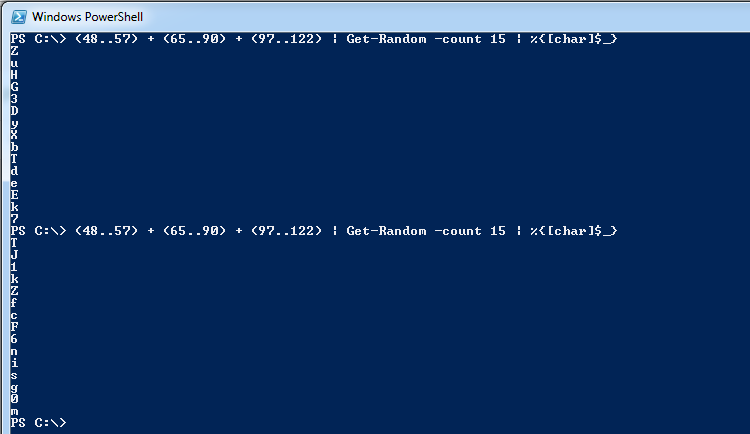
Taking 15 random numbers of the ASCII arrays and converting to characters


Good, we have a random list of characters in an array, but I need it in one long string so I can use it as a real password. For this purpose, we can use the join function of the [string] type with no delimiter:
[string]::join("",...

There you go, you now have your handcrafted random password generator.